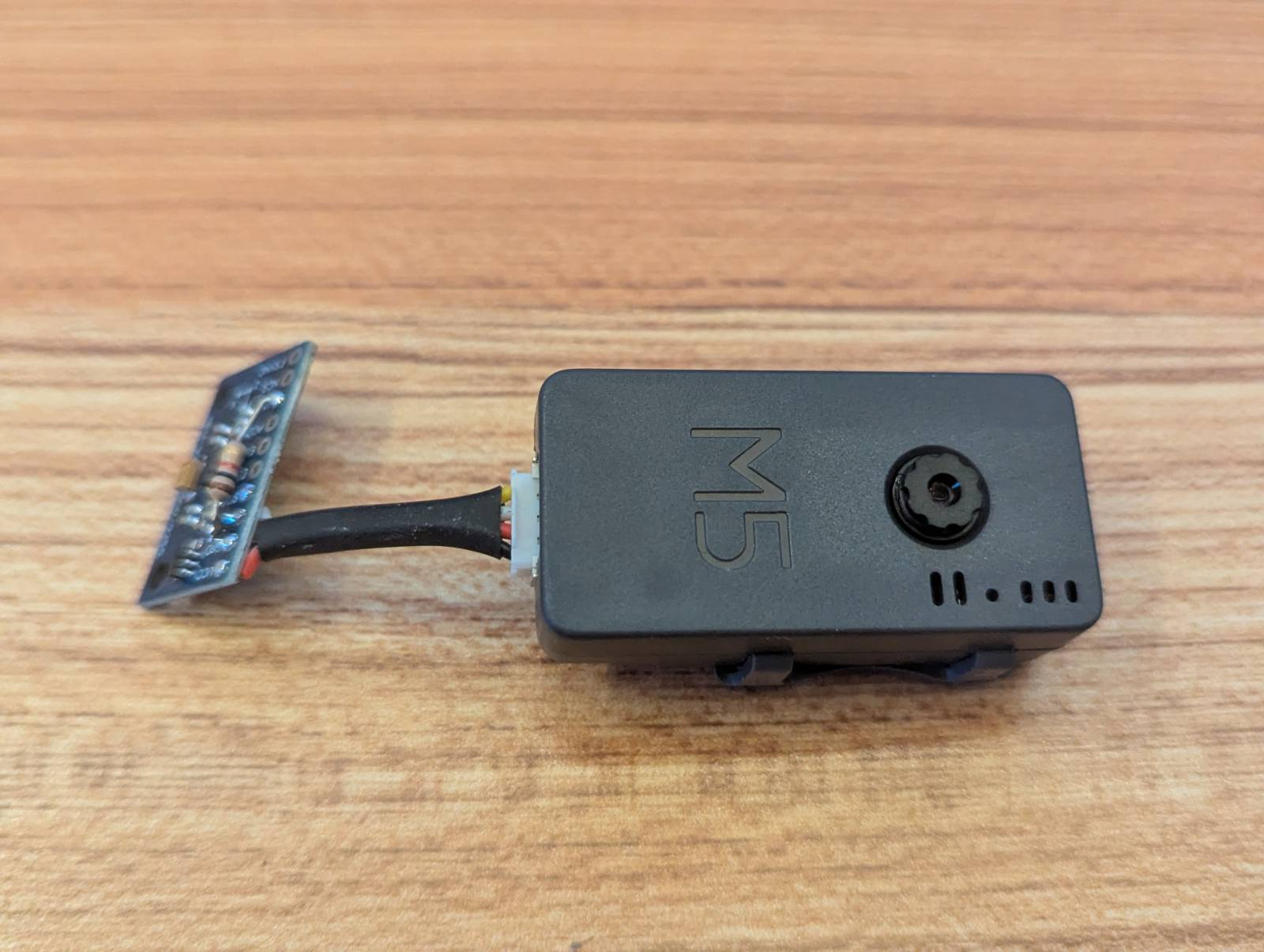
Today I tackled an interesting full-stack feature: recording patient movement data from an M5Stack camera with MPU-9250 sensors and displaying it through a web interface. The challenge was coordinating changes across embedded C firmware, a SvelteKit backend, and Svelte 5 frontend components. Here’s the camera we’re using to capture motion data and photos:
The Problem
The room-tracker project uses M5Stack cameras with built-in IMU sensors to monitor patients. Until now, the gyroscope and accelerometer data was only used for motion detection triggers. The new requirement was to record continuous movement sessions for later analysis - think physiotherapy exercises or fall risk assessment.
Key requirements:
- Start/stop recording from the web UI
- Buffer all sensor data on the camera during recording (no polling interruptions)
- Upload data when recording stops
- Display recordings in a table with drill-down to individual samples
Architecture Overview
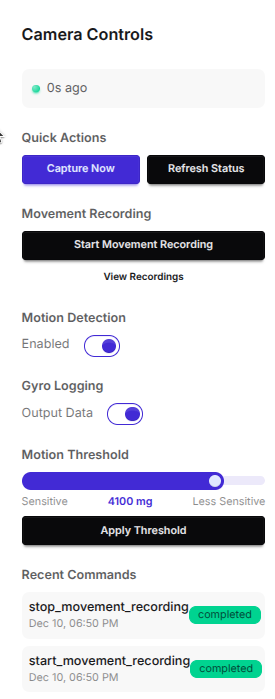
We’ve an ESP32 based Timer Camera (X) at the front which polls a server at the backend to pick up any control events on a queue. These events are added with the camera controls (Svelte) component.
The system spans three layers:
┌─────────────────────────────────────────────────────────────┐
│  Svelte 5 Frontend                                          │
│  CameraControlPanel.svelte → Start/Stop Recording buttons   │
│  /client/[name]/movements → Recording list & detail pages   │
└────────────────────────────┬────────────────────────────────┘
                             │ HTTP API
┌────────────────────────────┴────────────────────────────────┐
│  SvelteKit Backend                                          │
│  /api/clients/[id]/commands → Command queue                 │
│  /api/clients/[id]/movements → Movement CRUD                │
│  SQLite (Better-SQLite3) → movement table                   │
└────────────────────────────┬────────────────────────────────┘
                             │ HTTP (polling & upload)
┌────────────────────────────┴────────────────────────────────┐
│  ESP32 Firmware (camera_max)                                │
│  Command handler → recording mode toggle                    │
│  PSRAM buffer → gyro/accel samples                          │
│  HTTP client → upload JSON on stop                          │
└─────────────────────────────────────────────────────────────┘
Database Migration
Keeping things simple we just added a movement table with JSON data fields for the gyros and accelerometers and some handy time-stamps to allow us to stitch these datasets together if necessary and correlate them with any images taken and uploaded from the camera to the image server. We’ve also a status field which switches from pending to complete when the streaming is stopped.
The movement table design:
CREATE TABLE movement (
  id TEXT PRIMARY KEY,
  client_id TEXT NOT NULL REFERENCES client(id) ON DELETE CASCADE,
  started_at DATETIME NOT NULL,
  ended_at DATETIME,
  gyro_data TEXT,    -- JSON array: [{x, y, z, t}, ...]
  accel_data TEXT,   -- JSON array: [{x, y, z, t}, ...]
  record_count INTEGER DEFAULT 0,
  status TEXT DEFAULT 'recording' CHECK(status IN ('recording', 'completed')),
  createdAt DATETIME DEFAULT CURRENT_TIMESTAMP
);
Design decisions:
- Separate
gyro_dataandaccel_datacolumns rather than combined - easier to query independently statusfield allows UI to show in-progress recordings differently- JSON storage vs. normalized samples table - chose JSON for simpler queries and acceptable size (~170KB for 10 minutes)
Svelte 5 Runes for State Management
We’re using Svelte 5 runes here so, by way of a memory aid for the future me, here’s how we got them to manage the camera event queue.
The frontend uses Svelte 5’s new runes syntax. If you’re coming from Svelte 4, the patterns have changed:
// Svelte 4 style (old)
let recording = false;
$: isRecording = recording && elapsed > 0;

// Svelte 5 runes (new)
let recording = $state(false);
let elapsed = $state(0);
let isRecording = $derived(recording && elapsed > 0);
For the recording UI, the state management looks like:
let recordingMovement = $state(false);
let movementElapsedSeconds = $state(0);
let movementRecordingId = $state(null);
let elapsedInterval = null;

$effect(() => {
    if (recordingMovement && !elapsedInterval) {
        elapsedInterval = setInterval(() => {
            movementElapsedSeconds++;
        }, 1000);
    } else if (!recordingMovement && elapsedInterval) {
        clearInterval(elapsedInterval);
        elapsedInterval = null;
        movementElapsedSeconds = 0;
    }

    return () => {
        if (elapsedInterval) {
            clearInterval(elapsedInterval);
        }
    };
});
Key Svelte 5 patterns:
$state()replaceslet x = valuefor reactive variables$derived()replaces$:reactive declarations$effect()replacesonMount+ reactive statements for side effects$props()replacesexport letfor component props- Event handlers use
onclicknoton:click
The Command Queue Pattern
I didn’t want the power overhead of a server running on the camera but I did want control over it from the web interface. The best way to do this and use as little precious battery juice as possible was to poll the server from the camera looking for queued control events. This proved a pretty effective compromise.
The camera polls for commands periodically. When the user clicks “Start Recording”:
- Frontend POSTs to
/api/clients/[id]/commandswith{ command: 'start_movement_recording' } - Backend creates command record with status
'pending' - Camera’s next poll picks up the command
- Camera executes and POSTs result to
/api/clients/[id]/commands/[cmdId]/result - Frontend auto-refreshes via
$effect()polling when commands are pending
$effect(() => {
    const hasPending = commands.some(
        (cmd) => cmd.status === 'pending' || cmd.status === 'executing'
    );

    if (hasPending && !refreshInterval) {
        refreshInterval = setInterval(() => {
            loadCommands();
            loadClientConfig();
        }, 2000);
    } else if (!hasPending && refreshInterval) {
        clearInterval(refreshInterval);
        refreshInterval = null;
    }
});
ESP32 Firmware Recording Mode
The ESP32 camera is fairly constrained memory wise. It’s my first time for a while having to really worry about the size of those data packets and how much information can be cached on board etc. Wifi calls are fairly expensive, battery wise so there’s a tension between caching the data onboard and sending it back home to the server periodically. We’ll be looking for that sweet-spot further down the development line.
The firmware changes introduce a recording mode that:
- Disables all polling - no WiFi, no command checks, no image uploads
- Buffers samples in PSRAM - the ESP32 has 4MB of PSRAM available
- Samples at 10Hz - matching the existing 100ms main loop
Data structure design for memory efficiency:
typedef struct {
    int16_t gx, gy, gz;  // Gyro values (dps * 10 for precision)
    int16_t ax, ay, az;  // Accel values (mg)
    uint32_t timestamp;  // ms since recording start
} movement_sample_t;     // 16 bytes per sample

#define MAX_MOVEMENT_SAMPLES 36000  // ~10 minutes at 10Hz, ~576KB
Why buffer everything locally?
- WiFi introduces variable latency that would create gaps in data
- HTTP overhead per sample would be prohibitive at 10Hz
- PSRAM is cheap and available
- Upload once at the end is simpler and more reliable
API Endpoint Design
We’re using a fairly standard RESTful API for our new movement data. At client/<client_id>/movements/ there’s a table of all the movement data recorded for that patient and at client/<client_id>/movements/<movement_id> there is a table with the gyro and accelerator values over time. I’ll add a little 3D app there to visualize those movements.
The movements API follows SvelteKit’s file-based routing:
src/routes/api/clients/[id]/movements/
├── +server.js              # GET (list) + POST (create)
├── [movementId]/
│   ├── +server.js          # GET (detail)
│   └── data/
│       └── +server.js      # POST (upload sensor data)
Key implementation detail - the data upload endpoint:
export async function POST(event) {
    const { id, movementId } = event.params;
    const { gyro, accel, sample_count, duration_ms } = await event.request.json();

    db.prepare(`
        UPDATE movement
        SET gyro_data = ?,
            accel_data = ?,
            record_count = ?,
            ended_at = datetime('now'),
            status = 'completed'
        WHERE id = ? AND client_id = ?
    `).run(
        JSON.stringify(gyro),
        JSON.stringify(accel),
        sample_count,
        movementId,
        id
    );

    return json({ success: true });
}
What’s Next
Capturing this movement data is just the beginning. Hopefully there will be something of interest there at the analytic stage. Which is where advanced visualization and a bit of custom machine learning will come in.
Remaining implementation:
- Firmware recording mode and upload logic
- 3D visualization of movement data (Plotly.js?)
- Export to CSV for external analysis
- Movement comparison overlays
Questions to explore:
- Should we add real-time streaming during recording? (Would require WebSocket or SSE from camera)
- What sample rates would clinicians actually need? 10Hz might be too low for some applications
- How to handle interrupted recordings (camera loses power mid-session)?